Carplay/Android Auto Module for McLaren
5.0 / 5.0
(5) 5 total reviews
102 in stock
Get it between -
Couldn't load pickup availability
What's included?
What's included?
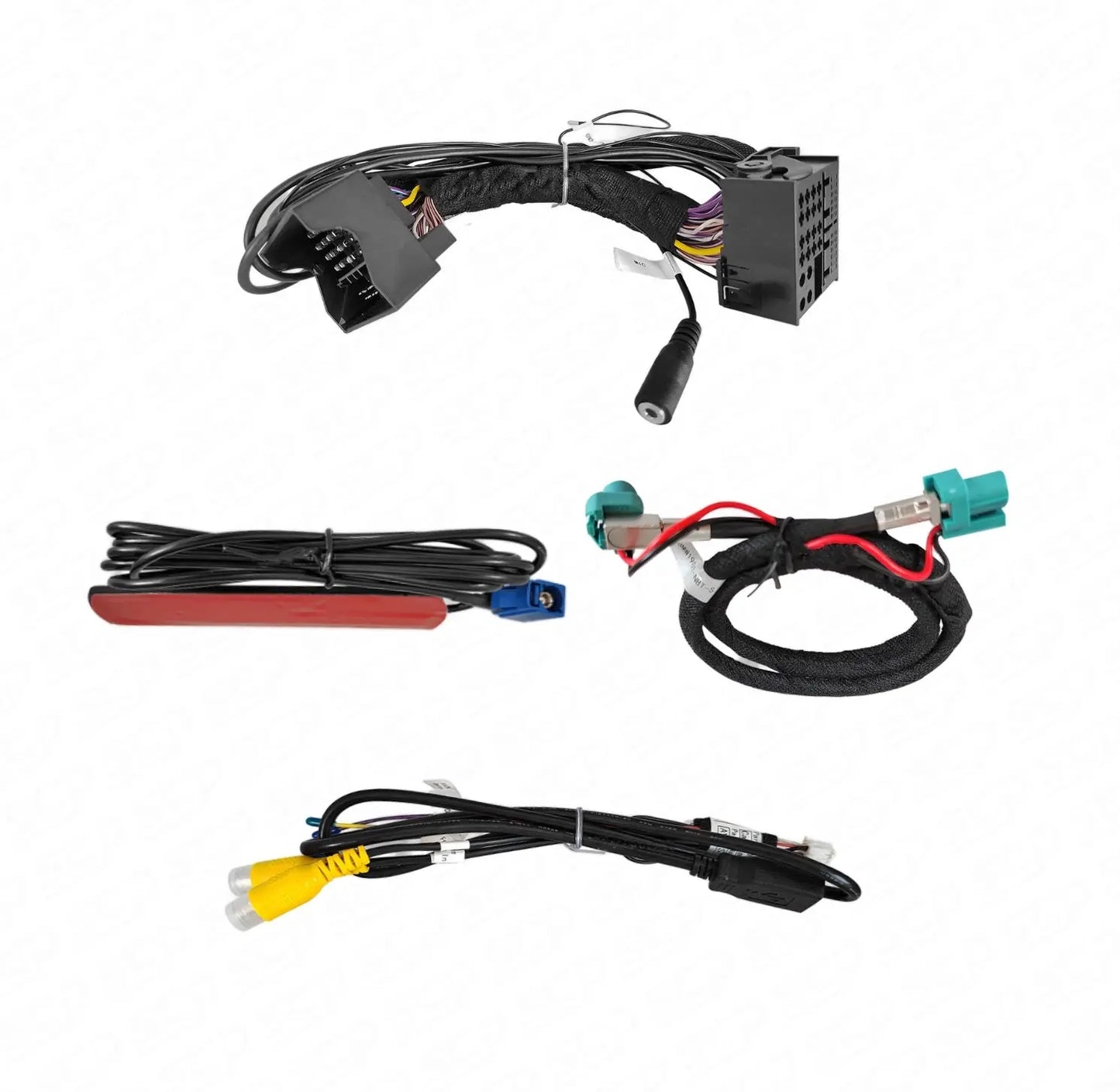
What's included?![]()


We provide clear instructions, including a detailed manual and a step-by-step installation video. The kit is completely Plug & Play.
The set includes an electronic module that adds the CarPlay function, along with wiring that connects directly to your car’s head unit.
Check the video for more information or contact our team if you need any assistance!

Compatibility
Compatibility
Compatible with the following McLaren models:
- P1
- 650S
- 675LT
- 540C
- 570S
- 600LT
- 620R
- 720S
- 765LT
- 750S
- GT
- Senna
WE GUARANTEE WORLDWIDE THE CHEAPEST CARPLAY SOLUTION FOR MCLAREN

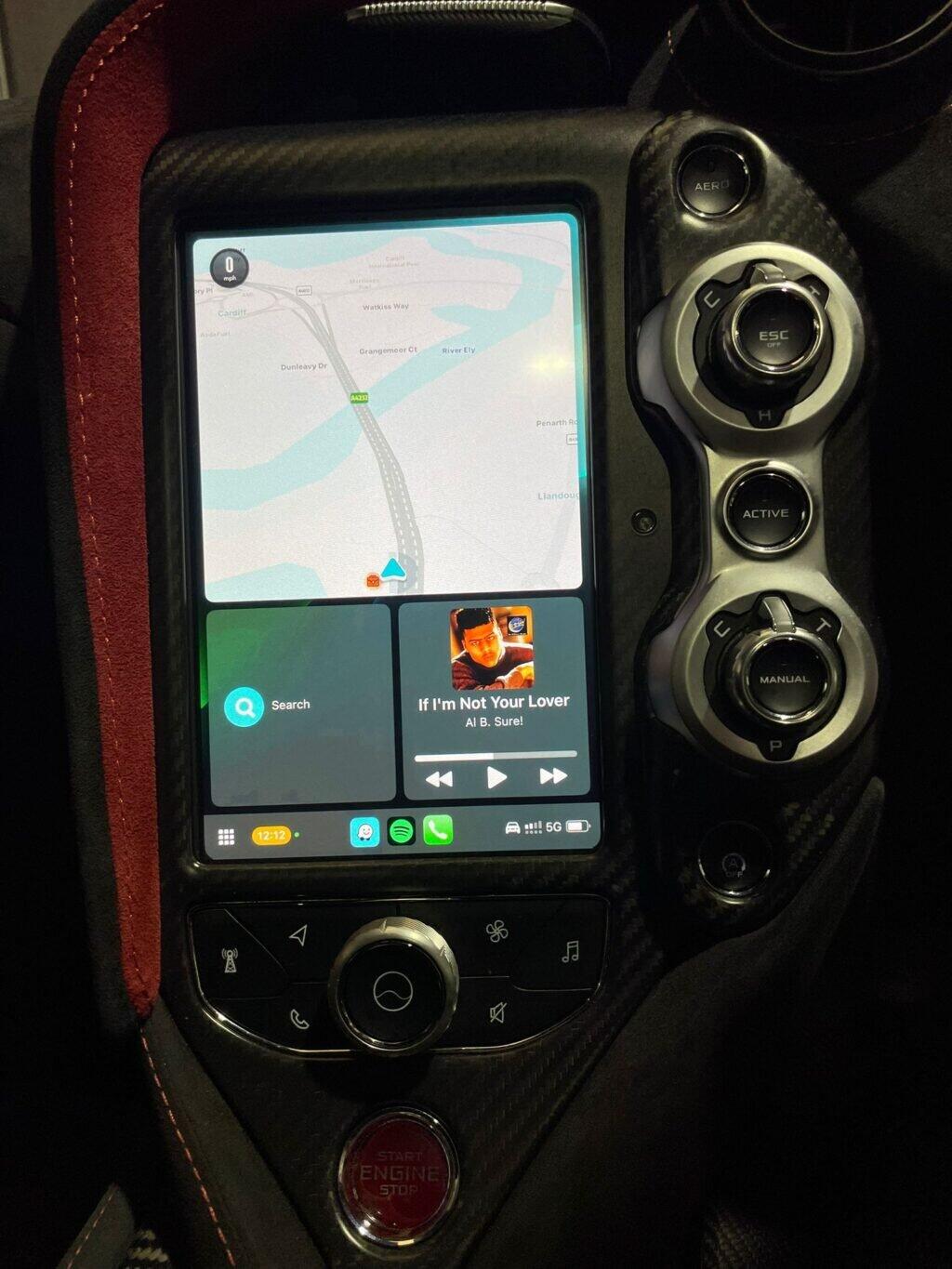
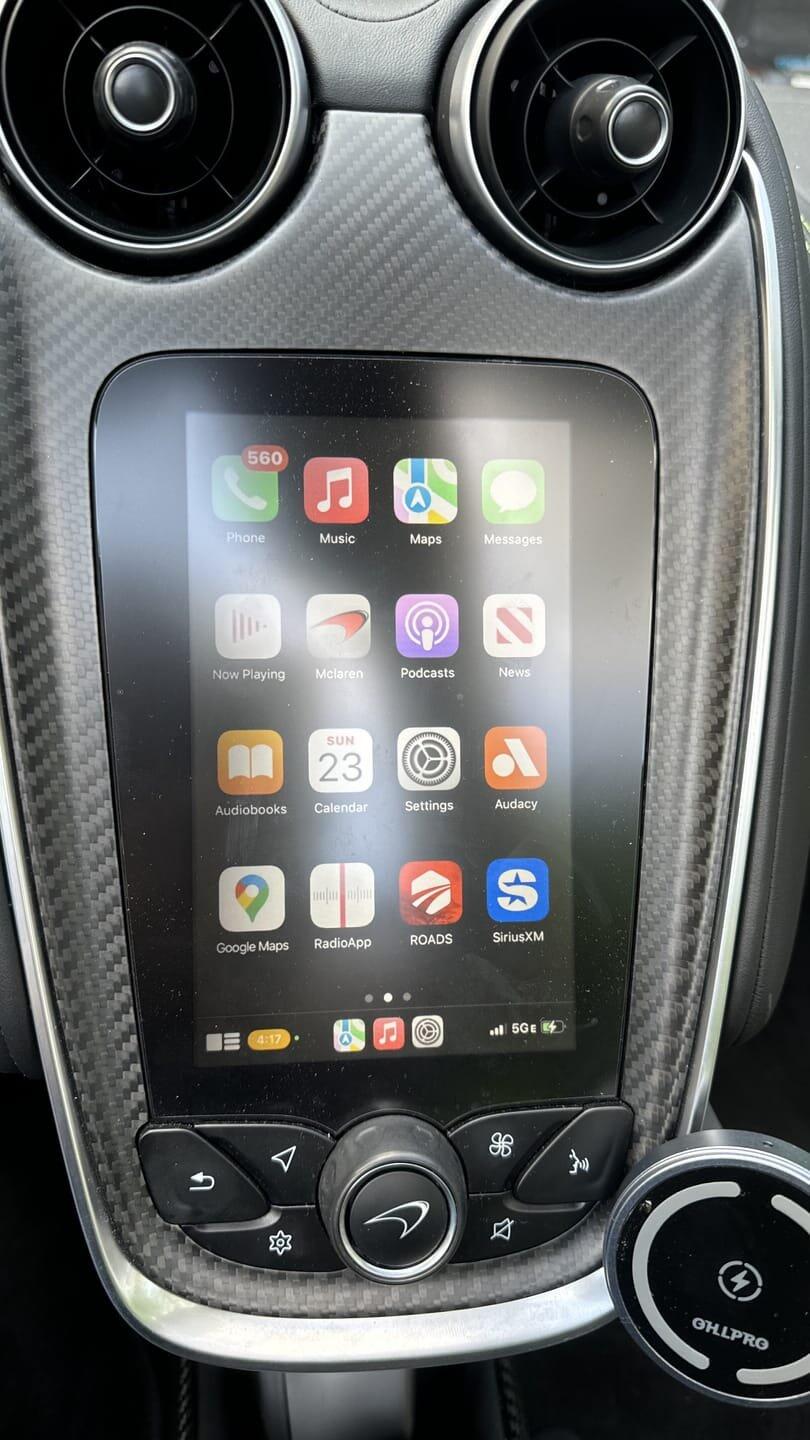
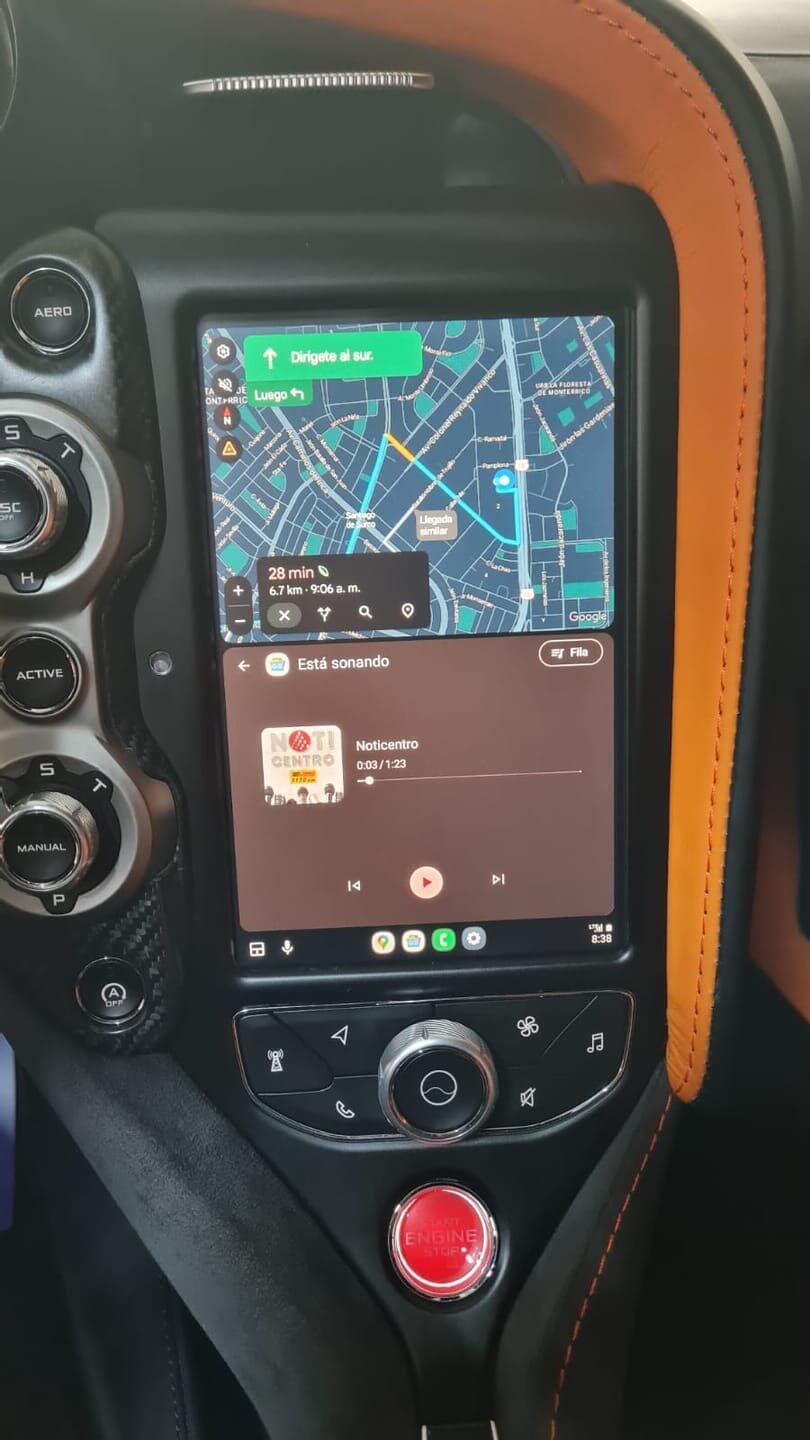
Upgrade your McLaren with Wireless Apple CarPlay & Android Auto on your original screen.
CarPlay Module for McLaren IRIS
McLaren owners have always been limited by the IRIS system — no CarPlay, no Android Auto. Competing products required replacing the entire screen with an aftermarket unit, which looks out of place and affects the interior quality and warranty.
We changed the game. In January 2024, we released the first plug in Module to activate CarPlay directly on the original McLaren IRIS display.
What This Upgrade Adds to Your McLaren
- ✅ Wireless Apple CarPlay & Android Auto
- ✅ Full retention of ALL original McLaren functions
- ✅ 100% Plug & Play
Order now and you get an AI-Box for your Mclaren for free.
AI-Box functions: - ✅ YouTube, Netflix, Instagram, TikTok
- ✅ Live TV / IPTV support
- ✅ Google Play Store – download any app
- ✅ Mirroring (iPhone & Android) via USB & WiFi
- ✅ HD video playback via USB
- ✅ Full retention of ALL original McLaren functions
- ✅ 100% Plug & Play
How It Works
Our system uses the IMPERIUM interface, purpose-built to integrate CarPlay, Android Auto and Mirroring directly into the original McLaren infotainment system — without coding, without modifying wiring, and without replacing the screen.
- ✔ Automatically recognized by the vehicle — no software activation needed
- ✔ Uses the original McLaren controls (joystick, buttons, touch)
- ✔ Works with Google Maps, Waze, Apple Maps, Spotify, etc.
- ✔ Mirroring displays your entire phone screen on the IRIS monitor
- ✔ USB playback supports HD video, music and images
NOTE: Installing this kit does not remove or disable any original McLaren functionalities.

Installation
Most of the work involves accessing the factory head unit, connecting our module and wiring, and then refitting the panels. we provide you with a clear instruction video. Installation could be done in 1 hour.
Plug & Play
Simply connect the module to your McLaren’s USB/diagnostic input, pair once via Bluetooth, and enjoy automatic connection every time afterward.
- ✅ Order before 16:00 → shipped the same day
- ✅ Pay safely: iDEAL, PayPal, Credit Card
- ✅ 2-year warranty
-
✅ 30-day free return policy

Need help? We are available by phone or WhatsApp.
2 years warranty
2 years warranty
All our products comes with a 2 years warranty. Doesn't work or you experience problems? We'll solve them, return your money, or send you a new product. Why we do this? Because our experience is that all our customers are 100% happy and we never get any return.
Plug & Play
Plug & Play
Our products can be used without modifications to your car. The system or cabling never needs to be tampered with. Just connect with Bluetooth and USB to your car. That's all!
Installation Video
Installation Video

Module is good. Used to have Android Auto in my 600LT 2020. Works the exactly the same as in my other car with original/OEM Android auto. Fair price, fair product.
The system is nice, and I can finally use my phone without the awkward Bluetooth connections, shitty connection. This is way better. Thank you for the service
As described. Installation done with your videos/some help from youtube. Can recommend.
nstalled the CarPlay module in my 675LT. Finally, the screen has the same use as I've got in my other cars. Using it mostly for Spotify and Maps/Waze. Installation was easy and the support of BoosterBox is good. Very satisfied.
I was (a bit) skeptical at first, but this upgrade is great. CarPlay runs smoothly, and the install was easy enough. With the help of a, more technical friend, it was done within 1.5 hour. I’ve had no major issues. Maps are clearer, music sounds great, and it’s so convenient not having to fuss with my phone. Happy with the purchase.
Collapsible content
FAQ
Frequently Asked Questions
Which apps can I watch?
You can use YouTube, Netflix, Disney+, Amazon Prime Video, Hulu, HBO Max, Apple TV+, live TV apps, IPTV apps, Twitch and many other apps available through the Google Play Store.
Can I change the language?
Yes. Go to Settings → Language. Most AI Boxes support more than 40 languages, including Dutch, English, German, French, Swedish, Spanish, Italian, Danish and many more.
Do I need to install or change any cables?
No. Our AI Boxes are completely plug & play. Simply connect the box to your car’s USB or USB-C port, wait a few seconds and it starts automatically. No technical knowledge or permanent installation is required.
How can I download apps on the AI Box?
Apps can be downloaded directly through the built-in Google Play Store. Simply connect the AI Box to the internet, open the Play Store and install your preferred apps. The AI Box works with both iPhone and Android phones.
Can I watch live TV?
Yes. Most television providers offer their own mobile app. Download your provider’s app from the Google Play Store, sign in with your account and watch live television directly through your car screen.
Does it affect my car’s warranty?
No. The AI Box is an external plug-and-play device. It does not modify your car’s software, wiring or original multimedia system, so it does not affect your factory warranty.
Is there any delay between video and sound?
No noticeable delay occurs during normal use. Audio and video remain synchronized, just like when watching YouTube or Netflix on a phone or tablet.
How does the internet connection work?
The AI Box connects to the internet through your phone’s mobile hotspot, an in-car Wi-Fi connection or a SIM card when supported by your model. Once connected, you can stream content and download apps directly on the AI Box.
Can I watch Netflix and YouTube while driving?
The AI Box can display video content while the vehicle is in use. However, the driver must never watch or operate video content while driving. Always follow local traffic laws and use video functions only when it is safe and legal to do so.
Will my system slow down or freeze?
The AI Box is designed for smooth everyday use. Performance may depend on the selected app, internet speed and available storage, but under normal conditions the system runs quickly and reliably.
Do I lose any original car functions?
No. Original functions such as the reversing camera, parking sensors, steering-wheel controls, radio, Bluetooth and vehicle settings remain available. The AI Box works alongside your existing system.
How do I know if my car is compatible?
Your car must support one of the following:
- Wired Apple CarPlay
- Wired Android Auto on supported systems
Not sure? Send us your car brand, model and production year. Our team will check compatibility for you free of charge.
Does the AI Box work with both iPhone and Android?
Yes. The AI Box itself runs on Android, but it can be used together with both iPhone and Android phones through Bluetooth, Wi-Fi or a mobile hotspot.
Does the AI Box need updates or maintenance?
Very little maintenance is required. When firmware or software updates are available, they can usually be downloaded and installed through Wi-Fi from the settings menu.
Can I still make calls or use navigation like before?
Yes. You can continue to make calls, use navigation, listen to music and access the original functions of your car as usual.
How long does it take to start?
The AI Box normally starts within approximately five seconds after it is connected and your car’s multimedia system is ready.
Is it legal to use in the EU?
The AI Box may be used in the European Union when operated in accordance with local traffic and road-safety regulations. The driver must not watch video content or operate the device while driving.
What if it does not work in my car?
Contact our support team with your car brand, model, year and a photo of your multimedia system. We will help you verify the connection and resolve any compatibility or installation issue.
Do I get a warranty?
Yes. All hardware includes a standard 12-month warranty covering manufacturing defects under normal use.
Still have a question?
Our support team is ready to help you find the right AI Box.